
This article is still relevant for the new MindManager 2017 32/64 bit versions.
32/64? What do I do?
Mindjet MindManager 15 hit the streets this week and for some the long-awaited Holy Grail of 64 bit support had at last been delivered. MindManager 15 supports 64 bit OS and 64 Bit Microsoft Office, requested for many years now. In fact it goes back as far as….well…forever from the many blog posts I have read over the years. Anyway, today it’s here. But what does this mean for the average MindManager user. There has certainly been some confusion over the 32/64 bit issue since MindManager 15 released and we have had many questions from customers asking about the all important 3rd party add-ins. Well, here is a short guide that we hope will help you navigate the 32/64 bit wilderness!
64 Bit – What’s so great about that?
OK. So lets start by explaining why 64 bit MindManager (MM64) might be good for you.
There are two main reasons why you would want to have MM64 installed. The first is that if you are using 64 bit MS Office, MindManager will now integrate with that. Something that in the past it could not do in its 32 bit clothes. The second is that 64 bit applications can use more memory. Basically put, a 32 bit OS can only access a maximum of 3gb of memory, (4gb is the maximum although around 1gb get preferential treatment for the OS itself), a 64 bit system on the other hand is only limited by the amount of RAM the system can hold.
With CPU/Graphic intensive software 64 bits systems with software that can utilize the extra memory above the 3/4Gb limit will work faster. This is only true while the data being manipulated can also benefit from the extra memory capacity though. With MindManager 15, hopefully, this means large Maps will become faster in their manipulation on a 64 bits system. Jury still out on that until we hear from some power users on 64 bit who notice the difference.
So 64 bit is great if:
- you’re using 64 MS Office
- you use super huge maps.
- you use MS Office 64 bit and use MindManager Office integration
So what version have I installed?
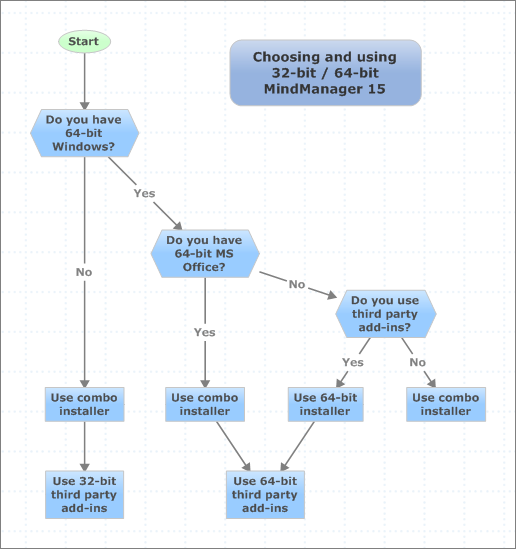
OK. here’s where its gets tricky. Mindjet have released an all in one installer which detects the best version (32/64 bit) of MindManager it will install. When you use the all-in-one installer from Mindjet;s website it should work like this:
Scenarios 1
- 32 Bit OS
- 32 Bit Office (Obviously)
MindManager 15 gets installed as 32 bit version.
You should be good to go!
Scenario 2
- 64 Bit OS
- 64 Bit MS Office
MindMangager 15 gets installed as 64 bit version.
Now we get tricky!
A dedicated MindManager 15 installer will be required here to force the install of the version you need. You can download dedicated 32/64 bit installer from the Olympic website here: http://www.olympic-limited.co.uk/downloads/
Scenario 3
- 64 Bit OS
- 32 Bit MS Office (Not obvious)
- No 3rd Party Reliance
MindManager 15 gets installed as 32 bit version
If you are not bothered about MS Office integration you could still benefit from 64 bit install if you use huge Maps and Mindjet have coded MindManager 15 to take advantage of the 64 bit memory capabilities. In this case you need to use a dedicated 64 bit installer. You can get this from out downloads page located here: http://www.olympic-limited.co.uk/downloads/
Scenario 4
- 64 Bit OS
- 32 Bit MS Office (Not obvious)
- 3rd Party Reliance
MindManager 15 gets installed as 32 bit version
Make sure that the 3rd party add-in you download is suitable for your install. Check your MindManager 15 version in the File -> Help dialog
Scenario 5
- 64 Bit OS
- 64 Bit MS Office
- Reliant on 32 Bit Addin
MindManager 15 gets installed as 64 bit version
If you need to utilize a 3rd party add-in that is only available in 32 bit then you need to use the stand alone 32 bit installer for MindManager 15. Note this will not give you access to MindManager MS Office functionality so a decision has to be made on the trade off between installs. In this case you need to use a dedicated 64 bit installer. You can get this from out downloads page located here: http://www.olympic-limited.co.uk/downloads/
Here is a map showing the options
Conclusion
The bottom line in all this is to make sure you know:
- Which version of MindManager 15 do I need?
- Which version of MindManager 15 has installed?
- Which version of any 3rd party add-ins do I need?
If you check these facts first and liaise with your add-in vendor (when necessary) you should have a happy MindManager 15 64 bit experience!
If you have any questions about this issue then please contact us through the form on the Contact Us page.